How to Analyze A/B Test Results in Heap Analytics with Optimal UX Integration
 Nov 6, 2024
Introduction
Analyzing A/B test results shouldn’t require you to learn new tools or switch between multiple platforms. With Optimal UX’s Heap Analytics integration, you can analyze your experiment results directly in your familiar Heap Analytics dashboard. This seamless integration enables product teams to leverage Heap’s powerful analytics capabilities while running A/B tests, making data-driven decisions easier than ever.
Why Integrate Heap Analytics with Your A/B Testing Tool?
- Track experiment participation alongside other user behavior metrics
- Create custom segments based on experiment variants
- Build comprehensive funnels that include A/B test data
- Analyze experiment results using your existing Heap dashboards
- No additional learning curve for your analytics team
Step-by-Step Integration Guide
Enable the Integration
- Access your Optimal UX dashboard
- Go to Settings > Integrations
- Locate the “Heap Analytics” integration
- Enable the integration toggle
Understanding Data Flow
When enabled, Optimal UX automatically sends experiment data to Heap Analytics through user properties:
- Data is sent via the
heap.addUserProperties()function (learn more) - Each experiment creates a property named
experiment_[experiment_slug]
Security Note: Optimal UX uses experiment slugs instead of full experiment names to ensure data security.
Using Experiment Data in Heap Analytics
Finding Your Experiment Data
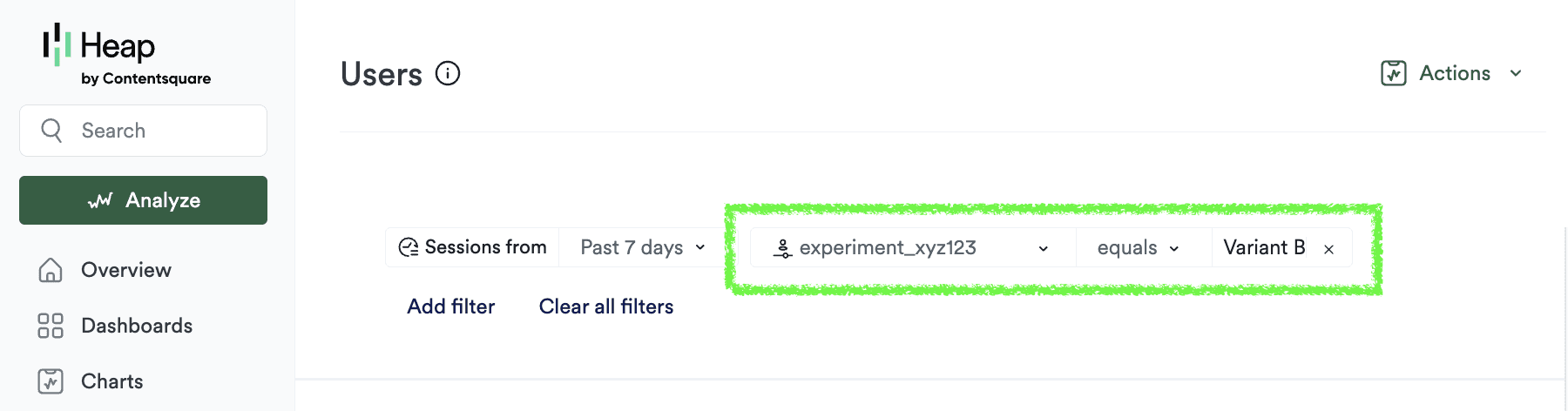
- Navigate to Heap Analytics
- Open the Users section
- Click “Add filter”
- Look for properties beginning with “experiment_”
- You can save it as a segment by choosing “Save as Segment” under “Actions” in the top right corner
Analysis Capabilities
- Compare conversion rates between variants
- Discover user behavior patterns within experiment groups
- Create conversion funnels filtered by experiment participation
- Combine experiment data with other user properties
Conclusion
Integrating Optimal UX with Heap Analytics empowers teams to analyze A/B test results within their preferred analytics platform. It takes less than a minute to start sending A/B test results there.